AI-native agency management · Coming 2026

Agency management that knows what the work is worth.

One platform for projects, time, capacity, estimating and invoicing, with the financial picture live as the work runs. Your team spends the day on the work, not feeding an operating system.

Built by Function Software, the company behind Function Point and FunctionFox, trusted by 1,300+ creative agencies.

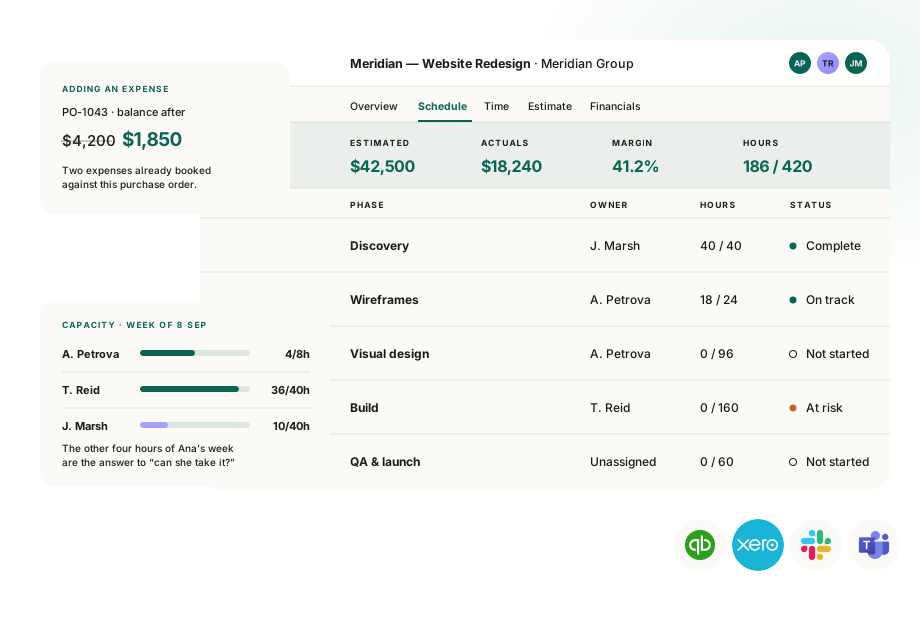
Frankly project view showing estimated against actual figures, phase status, a purchase order balance and weekly team capacity
Early access is open. Book a walkthrough today and get early pricing of $37.50 per user, per month.Book a walkthrough →

What’s in the platform

Frankly, we’ve got it all.

Everything from the first conversation with a prospect to the invoice that closes the job. Every part of it is built around how creative agencies work, rather than adapted from a system built for somebody else.

And this is only part of the list…

See everything that’s included →
  • Pipeline & CRM
  • Briefs
  • Estimating & quoting
  • Value-based pricing
  • Projects
  • Tasks
  • Gantt & calendar views
  • Capacity & utilization
  • Forecasting
  • Time tracking
  • Timesheet approvals
  • Invoicing
  • Retainers
  • Purchase orders
  • Expenses
  • Job costing & markups
  • Cash flow
  • Client financials
  • Multi-currency
  • AI agents & automation
  • Reporting & dashboards
  • QuickBooks Online & Xero
  • SSO & multi-factor
  • Slack & Teams Coming soon
  • Freelancer seats Coming soon
  • Client portal Coming soon
  • Proofing Coming soon

One system for everyone.

What each role gets out of it.

Meridian Rebrand · Estimate · Meridian Group

LinesPhasesFinancialsOutcomesApprovals

Revenue

$42,500

Cost

$20,240

Profit

$22,260

Margin

52.4%

PhaseCostRevenueMargin
Discovery$3,900$10,00061.0%
Design$6,720$15,00055.2%
Build$9,620$17,50045.0%

Name your margin

60%

$50,600

The services revenue this estimate needs to reach 60%.

For agency owners

  • Profit margin at every stage. On the estimate, on the work while it is running, and in reporting afterwards.
  • Capacity and forecasting. Know whether you have room for new business before you say yes to it.
  • Value-based pricing. Optionally, price on the value of the outcome rather than the hours it takes to get there.
  • Dashboards and scheduled reports. The numbers you need, arriving without you having to run anything.

Questions we get asked by agency owners

How is it priced?

One plan at $42 per seat per month on annual billing, with every capability in it, integrations counted. Sign up before 1 November and it is $37.50 per seat per month. Each seat carries a monthly allowance of agent credits that resets every billing period, and agencies that work through it can buy additional credit blocks. What you have used shows in your admin dashboard. See the pricing page.

How secure is it, and who can see the numbers?

Roles and permissions are granular, financial visibility is graded so people see only the figures they should, and every change is written to an audit log. The agents inherit the permissions of whoever is using them and never get elevated access.

How long does it take to get up and running?

Under a month for most agencies. Every implementation comes with guided sessions and a dedicated CSM who builds the system out with you rather than handing you a template, and how much of that you get scales with the implementation package you choose.

How much can I customize the reporting?

You start with a set of reports we have built from years of watching what agencies actually need. Past those, anything can be custom: choose the dataset, the columns and the grouping in the report builder, or ask an agent in your own words for the report you want and have it built for you.

Meridian Rebrand · Schedule · Meridian Group

GanttListCalendarBoard
Sep 1Sep 8Sep 15Sep 22Sep 29Oct 6
BLDiscovery
?Wireframes
?Visual design
DIFront-end build
?QA and launch

Wireframes · 8–19 Sep

Search role or person…

People

Bea Lindt31h free
Colin Faraday9h free
Desmond Iyer0h free

For project managers and traffic

  • Availability at your fingertips. Your team’s availability sits inside the scheduling tool itself, not in a separate feature you have to go and check.
  • Build a project at a time, see all of them at once. Phases and dependencies nested underneath each project, and the same timeline showing everything in flight when you zoom back out.
  • You don’t have to build a schedule by hand. Start from an estimate, a template or a copy of a similar project, or ask an agent and work on it together.
  • Time off comes straight out of capacity. Approved holiday removes that person’s availability, so nobody gets scheduled over it and nobody files a timesheet for it.

Questions we get asked by project managers and traffic

How long does it take to get a project set up?

A few clicks, and none at all if you ask an agent to do it. We also don’t make you write an estimate first. Sometimes you just need the project to exist so people can start putting time against it, so open one, get the work moving, and build the estimate later when you know what the work is. Any time logged before then moves across to the right lines.

Is there one view where I can see all the work we’ve got on the go?

There are several, because people see work differently. Open a single project and see its phases and tasks. Pull back and see every project’s schedule on one timeline. Or look at it as a task board and watch what is in progress across the whole team right now. Every view is customizable, so find the one you like, set it up the way you want, and live there for most of the day.

How do I know when somebody isn’t free? Is there vacation tracking?

There is an availability section where people submit time off, and an approval process that runs in the system. It isn’t a full HR platform, but it covers enough to work as a light one. The part that matters for scheduling is that approved time off comes out of that person’s capacity automatically, so nobody is booked over a holiday and nobody has to file a timesheet for it.

What alerts do we get, and where?

Email and in-system alerts, and you choose which ones you want. The aim is that an alert tells you something actually needs your attention rather than adding to the noise.

Does it connect to the tools we already talk in?

Slack, Microsoft Teams, Office and Outlook are on the near roadmap rather than in the launch build. They are built to feed timesheets, tasks and conversation back into the system rather than only posting notifications at you.

Finance · Dashboard · All clients

Ready to bill · $37,960

Meridian Group $22,330
Northbank $9,480
Kite $6,150

Outstanding · $21,800

Current $12,40030 days $5,25060 days + $4,150

Late, and worth a nudge

Northbank · INV-2041$5,250
12 days lateSend reminder
Kite · INV-2036$4,150
34 days lateSend reminder

For finance

  • Revenue and billing schedules. Built from scratch or from a template, so the money has a shape ahead of time and finance and project managers are working from the same plan.
  • Invoices built from the evidence. The billable value of every timesheet and expense on the project, gathered for you rather than chased.
  • Purchase orders and expenses that reconcile easily. See open balances, close out the orders that are done, and return whatever is left to the project budget.
  • QuickBooks Online and Xero. Accrual accounting supported, and the sync is not a paid module.

Questions we get asked by finance

What exactly syncs with your accounting integrations?

It runs both ways. Invoices go across as invoices, with Frankly services mapping to income items, and expenses go across as bills against the relevant cost of sales or expense accounts. Then the payments come back: when a client pays an invoice or you pay a vendor in QuickBooks or Xero, that payment pulls into Frankly and shows on the record here. There is more detail than fits on a page and it matters, so it is worth walking through properly on a call.

Can we put payment links on our invoices?

Yes. Frankly integrates with both Stripe and Payroc, so your clients can pay straight from the invoice. Stripe is the quick one to set up and it is what we usually recommend, but if you already have a preference we will work with it, and if you don’t we are happy to talk through which suits your agency best.

Do you support multi-currency?

Yes. You set a home currency for the agency and can give each client their own. Estimates and invoices go out in the currency the client actually pays in, and you can toggle any of them to see the home-currency equivalent. Everything also carries a saved home-currency value underneath, which is what flows into your consolidated reporting, so the numbers roll up cleanly however many currencies you bill in.

Who can see costs and the financials?

The point of getting costs into Frankly is so the right people get a clear line of sight on profitability and cash flow, which means we take visibility seriously. Staff costs, whether individual or blended rates, sit behind their own permission and stay hidden from anyone who shouldn’t see them, everywhere in the system. The financial area is granular beyond that too. Someone can have permission to create and edit an invoice without having permission to send it to QuickBooks or Xero.

Can we get our data out, and is there an API?

Yes to both. There is a public API, every report exports to CSV or PDF, and our MCP connection lets you pull data straight into your own tools. Your data is yours.
Time · Tuesday 8 Sep · A. Petrova

Log time

Duration

2:30

Date

2026-09-08

Project

Meridian Rebrand

Service (billing rate)

Design & art direction

Task

Wireframes, key templates

Description

What did you work on? (optional)
CancelSubmit

Drag on the timeline to create an entry. Click one to edit it.

8:009:0010:0011:0012:0013:0014:0015:0016:0017:0018:0019:0020:0021:0022:0023:00
SavedMeridian RebrandWireframes · $420.00
NorthbankConcepts · $260.00

For creatives

  • Six ways to track time. A timer, your day, the task, the schedule, the timesheet grid or an agent. One of them will fit how you actually work.
  • No estimate line required. Time lands on the work whether or not anybody has priced it yet, so your contributions are never blocked by paperwork.
  • The conversation stays with the work. Comments and @mentions on the task itself rather than in a separate chat thread.

Questions we get asked by creatives

How much of my day is this going to eat?

The idea is that it gives you time back. What you need to do today shows up in one place, so you are not hunting through email threads, spreadsheets or a half-hearted project management tool to find it. Time tracking is built to take seconds, and sometimes no effort at all. Mark a task complete and Frankly asks how long it took and files it for you.

How many fields do I have to fill in every time I submit a timesheet?

Two, and sometimes fewer. How long it took and what it was for. If your agency works in tasks, that is the task and the duration, and you are done. If you are closing off a task you have been working on, Frankly asks how long it took right there and puts the time where it belongs. Set things up right and it can be one field, or none at all.

Does it work on my phone?

A mobile version is coming after launch, built around the things you actually need on the go, with time tracking first. The full Frankly is a big system made for a proper browser, so the mobile version is a deliberately streamlined take on it rather than the whole thing squeezed onto a small screen.

What it does

Five places the admin disappears.

The parts of the platform that take work off someone’s desk, rather than adding another screen to visit.

AI

Agents that draft, not decide.

Ask for the outcome in your own words. Frankly assembles the whole change and shows it to you, inside your own permissions. Nothing is written until you accept it.

See it on a walkthrough →

Your agents

WRKFINCRM
WRK

Hi Ana, I’m the Work agent. Ask me about a project, or paste a brief and I’ll draft the schedule for you to review.

Send
Cap

Capacity before you assign.

Everyone's availability for a given date range sits in the assignee list, on the schedule itself, so you never leave for a separate view to find out who can take the work. Assign to a role when you don't know the person yet.

See what’s included →

Assign · 8–19 Sep

Bea Lindt31h free
Colin Faraday9h free
Desmond Iyer0h free
$

Estimates priced on value.

You can attach an outcome to any estimate, say what reaching it is worth to the client, and claim a share of that value. The line stops being hours times rate and becomes what the result is worth.

See what’s included →

Outcome #1

Qualified leads180
Value to client$180,000
Share claimed12%

Total billable$21,600

Inv

Invoices from the evidence.

Frankly gathers the billable value of every timesheet and expense on the project and builds the invoice out of them. Nothing to export from another system, and nobody to chase for what the work actually cost.

See what’s included →

Invoice draft · Meridian

Time · 122.5h$18,420
Expenses · 2 items$3,910

Invoice total$22,330

Rep

Reports built from the question.

Dictate the question you want answered and the report gets built for you, rather than you assembling every column, grouping and chart by hand.

Bring a hard question →

Ask for the report you want

Which clients went over their estimate last quarter, and by how much?
Send

Get started

Bring the question you can’t currently answer.

Half an hour with someone who knows agencies. We'll ask how your agency actually runs before we show you anything, so what you end up seeing is the part that matters to you.